前言
本来我是懒惰设置博客的,但是因为我朋友突然间跑来炫耀说他写了个个人网站。而我这个朋友完全不懂代码,我好奇他能写出什么样的就去看了下。好家伙,还蛮不错的,仔细问了下他是用cursor写出来的这样他还来找我说他一天就做完而我做不出来。结果我一气之下,就产出了这个博客网站。
基本设置
博客的基本设置我都是参考这个博客,感谢这位大佬的博客,里面详细的说明了基本博客设置和主题设置。
- Sakana 插件: https://github.com/itorr/sakana
- 右键菜单(本博客未使用): https://github.com/LanlingKira/key_style_right_click_menu
博客部署
此博客使用Github Page来部署在Github上,并使用Github Action来实现CI/CD。
博客结构
此博客使用了hexo框架和next主题来构建。本来我的本意是想着next主题和hexo框架是不同的Git仓库(repo),所以我也创建了2个Git仓库,主博客和next主题,并添加next主题为主博客仓库的子模块(sub module)。殊不知这带来了诸多不便和麻烦。。。
Git仓库和子模块的链接
起初我以为只要设置了子模块,它就会自动与子模块仓库中的特定的branch保持同步。然而事实却是它绑定的只是子模块仓库中的某个commit。也就是说当在子模块仓库commit了一些改变/修复一些bug,它并不会自动反映到主仓库。简而言之就是,每次更新子模块仓库后,需要更新主仓库中子模块的commit。这和我最初设想的完全相反。
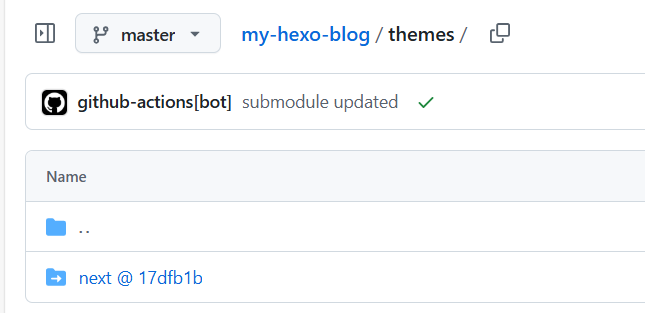
自动化更新子模块
为了解决上述问题,我配置了Github Action来自动化更新主仓库。
子模块仓库的workflow yml,每当有新的push时,会自动dispatchsubmodule-updated事件去主仓库。
1 | name: Dispatch Update to Parent Repo |
主仓库的workflow yml,监听submodule-updated事件来更新子模块的commit。懒惰去找有什么现成的action,一条一条git命令比较简单
1 | name: Update the submodule commit id |
其他设置文章
其他有意思的设置,但是我懒惰写的文章连接
- NexT主题美化
- Hexo+NexT(v7.72)博客主题美化,打造“超炫”网站(一)